
Getting Started with Core Transit
Welcome to Core Transit! This guide will walk you through navigating your client area and ordering your first service.
What Core Transit Does
Core Transit provides tunnel-based IP connectivity — L2TP, GRE, WireGuard, and our full managed Enterprise Solution — that delivers static, internet-routable IPv4 & IPv6 addresses to locations that don't easily get them otherwise (behind NAT, CGNAT, Starlink, mobile 4G/5G, etc.). We also offer BGP session add-ons and static IP leasing for customers who want to advertise their own routes or run their own AS.
Whether you're a consumer user who wants a static address for your home office, a business that needs deterministic IP addressing, or a startup ISP building out BGP-enabled infrastructure, there's a tier built for you.
Navigating the Client Area
Everything lives at client.coretransit.net. Here's what you'll find in the top navigation:

- Tunnel Services — our store, where you browse and order services
- Open a Ticket — submit a support request directly
- Support menu:
- Contact Us — general inquiries
- Network Status — live status of our infrastructure
- Knowledgebase — configuration guides and how-tos (you're here!)
- News — announcements and product updates
- Login — access your client dashboard, invoices, tickets, and active services
Once logged in, your dashboard is your home base — from there you can view active services, open/track tickets, manage billing, and download client area credentials.
Note: Accounts are created at Checkout
You don't need to sign up before you shop. If you're a new customer, you'll be prompted to create an account during the checkout step — that's how your login credentials are issued. The email address and password you set there become your client area credentials.
Once the order is complete, use those credentials to log in at client.coretransit.net. If you're an existing client, log in at the start of checkout so the new service is attached to your current account rather than a second one.
Choosing a Service
Head to Tunnel Services in the top menu to see our current offerings. The main things to decide:
|
Question |
Recommendation |
|
Do you want the easiest modern tunnel to deploy without sacrificing performance? |
WireGuard Tunnel – Fast, lightweight, and simple to configure. Recommended for most new deployments using supported routers such as UniFi, MikroTik, pfSense, GL.iNet, and others. A great choice for LTE/5G, Starlink, or other NATed connections |
|
Do you already have a static public IP and want to route public address space or run BGP? |
GRE Tunnel – Best for business and enterprise connections with a static public IP. Provides a stable Layer 3 tunnel for routed public IP blocks and BGP. |
|
Does your ISP use CGNAT, dynamic public IPs, or do you have no control over your Internet connection? |
L2TP Tunnel – Designed for environments where a traditional routed tunnel is not practical. Ideal for residential Internet, LTE/5G, Starlink, or other NATed connections. |
|
Do you need to advertise your own IP prefixes or ASN? |
BGP as a Service – Available as an add-on product to supported tunnel types for organizations announcing their own public address space. |
|
Do you require additional public IPv4 address space? |
IPv4 as a Service – Provides dedicated public IPv4 address allocations for customers who need Internet-routable addressing without managing their own address space. |
Not sure which fits your setup? Open a ticket or set up a meeting time, and our team will help you choose before you order.
Placing an Order
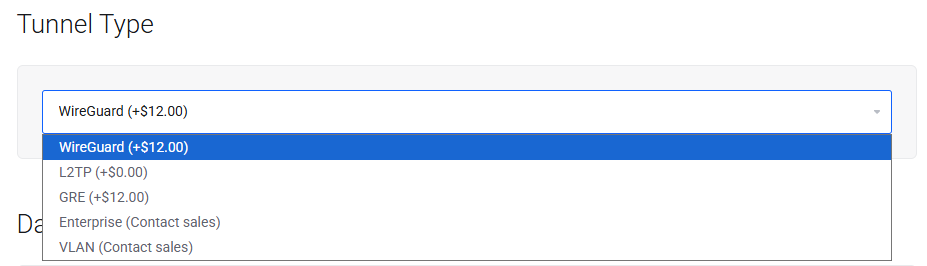
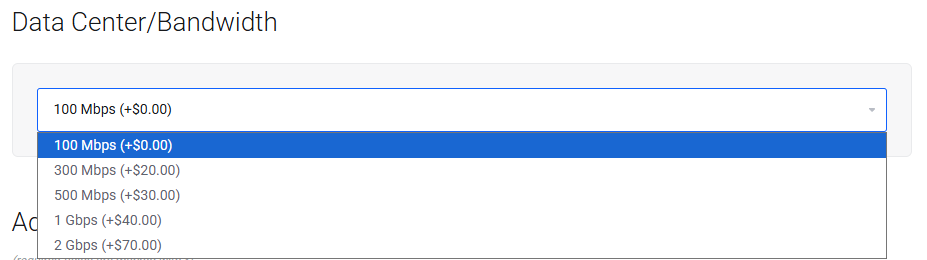
- From Tunnel Services, select the plan that matches your use case (pricing and speed tiers are listed on each product).
- Add it to your cart. You'll see any applicable setup fee and monthly recurring cost before checkout.
- Complete checkout — if you don't have an account yet, you'll create one during this step. Existing clients simply log in.
- Choose your payment method and confirm the order.
After You Order
Once your order is provisioned, you'll get connection details for your tunnel. From there:
- Visit the Knowledgebase for a configuration guide matching your platform — we have guides for Cisco, MikroTik RouterOS, pfSense, GL.iNet, and more, covering L2TP, GRE, WireGuard, and BGP setup.
- If you get stuck, Open a Ticket — our support team can walk you through configuration.
- Check Network Status any time you want to confirm our infrastructure is healthy.
Need Help?
Our support team is available through the ticket system at any time. Don't hesitate to reach out if you have questions about which service fits your needs, or if you run into trouble during setup.


