
Summary
Path MTU (PMTU) testing determines the largest packet size that can successfully travel between two devices without fragmentation.
Knowing the Path MTU is useful when troubleshooting:
- WireGuard tunnels
- VPNs
- GRE/IPsec tunnels
- MPLS circuits
- Dedicated Internet Access (DIA)
- General Internet connectivity
An incorrect MTU can result in:
- Slow applications
- Websites partially loading
- Packet loss
- Tunnel instability
- Poor VoIP or video performance
This article demonstrates how to determine the Path MTU using the standard "ping" utility.
What is MTU?
The Maximum Transmission Unit (MTU) is the largest Layer 3 packet that can be transmitted across a network interface without fragmentation.
Different network technologies support different MTU values.
| Network Type | Typical MTU |
| Ethernet | 1500 bytes |
| PPPoE | 1492 bytes |
| WireGuard | Usually 1420 bytes (depends on encapsulation) |
| Jumbo Ethernet | 9000 bytes |
The Path MTU is the smallest MTU along the entire route between two devices.
Even if your local interface supports 1500 bytes, an intermediate network may only support a smaller value.
How Path MTU Discovery Works
Normally, routers may fragment packets that exceed the MTU of a link.
When the Don't Fragment (DF) bit is set, routers are prohibited from fragmenting the packet.
Instead, if the packet is too large, it is discarded and an ICMP "Fragmentation Needed" message is returned to the sender.
By gradually adjusting the packet size, the largest packet that successfully traverses the path can be determined.
Windows Procedure
Open Command Prompt.
The Windows syntax is:
ping <destination> -f -l <size>Where:
- -f sets the Don't Fragment bit.
- -l specifies the ICMP payload size.
Example:
ping 1.1.1.1 -f -l 1472If the packet is too large, Windows displays:
"Packet needs to be fragmented but DF set."
If successful:
Reply from 1.1.1.1:
Linux
Linux uses:
ping -M do -s <size> <destination>Example:
ping -M do -s 1472 1.1.1.1The -M do option sets the Don't Fragment flag.
Finding the Correct MTU
Begin with a payload size of 1472 bytes.
1472 bytes (ICMP payload)
- 20-byte IPv4 header
- 8-byte ICMP header
= 1500-byte Ethernet frame
If the ping fails, reduce the size. If the ping is successful, increase the size.
Example:
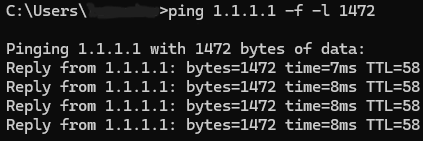
Since the ping was successful, we increase the size.
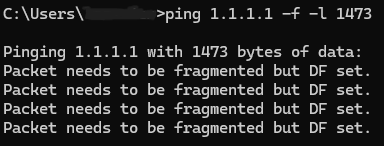
Continue increasing or decreasing until you locate the largest successful payload.
Calculating the MTU
Once the largest successful payload is found:
MTU = Payload Size + 28
Example:
Largest payload:
1452
Calculation:
1452 + 28 = 1480
The Path MTU is:
1480 bytes
Example Troubleshooting
A customer reports intermittent connectivity over a WireGuard tunnel.
Testing reveals the calculated Path MTU is:
1452 + 28 = 1480
If the tunnel interface is currently configured for an MTU of 1500, reducing it to approximately 1480 bytes (or slightly lower to account for tunnel overhead) may resolve fragmentation-related issues.
Notes:
- The optimal MTU for a tunnel depends on the encapsulation overhead of the protocol in use. WireGuard, IPsec, and GRE each add different amounts of overhead, so the tunnel MTU may need to be set lower than the measured underlying Path MTU.
- Test multiple destinations to verify whether the limitation is specific to one path.
- Perform testing both on the underlying Internet connection and through the Core Transit tunnel when troubleshooting tunnel performance.
- Always use the largest payload that succeeds without fragmentation.
- If ICMP is filtered by the destination or an intermediate firewall, Path MTU testing may not provide reliable results.


