
Core Transit BGP Configuration:
BGP Communities:
1097:2000 - DePrefer Core Transit (for backup BGP path)
Core Transit depref community 1097:2000 will set tagged prefixes with a less preferred local_pref of 50 within the Core Transit network and will AS_PATH prepend 5x ASNs to the path. This effectively enforces the prefix to be treated as a “standby” path from the Internet’s perspective because it will not be advertised to Core Transit upstreams unless there is no other path available via the Internet.
BGP Sessions:
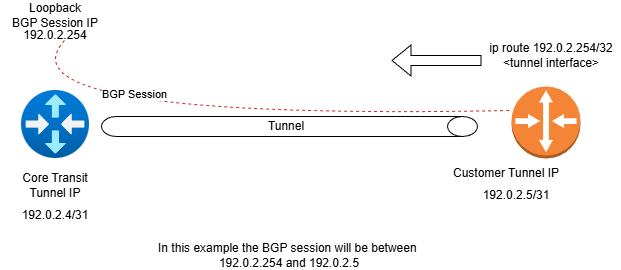
Note that BGP sessions terminate on a loopback on the Core Transit router your tunnel is connected to. This helps simplify our infrastructure and policies. Please note, however, that with will require reachability to the loopback from your tunnel IP used to source your BGP sesssion. Because our BGP session IP in a loopback vs on the tunnel directly is NOT a connected route. This means you will need to ensure your BGP traffic can make it to us over the tunnel. This is easily addressed with an IPv4 /32 route or IPv6 /128 route into the tunnel toward Core Transit for the Core Transit session IP we provided you.
Looking Glass:
Mikrotik BGP Community Config Example:
Example RouterOS 7 config syntax to set this community on Core Transit peers. 198.51.100.0/24 is the example IPv4 prefix to advertise.
/routing/filter/rule add chain=BGP_Filter_Out disabled=no rule="if (dst == 198.51.100.0/24) { set bgp-communities 1097:2000; accept }"
Cisco BGP Community Config Example:
! match your prefixesip prefix-list EXPORT-ROUTES permit 198.51.100.0/24
!include prefixes in match statement in route map and set the communityroute-map EXPORT-ROUTES permit 10 match ip address prefix-list EXPORT-ROUTES set community 1097:2000
!Apply route map to your neighbor configuration router bgp <YOUR-ASN> neighbor <NEIGHBOR-IP> route-map EXPORT-ROUTES out
NAT and BGP
Core Transit uses a "passive" configuration, meaning the customer side of the BGP session must be the initiator. If your side is also passive, the session will not come up.
Additionally, if customer traffic is NATed, sometimes an active session on the Core Transit side would have come up. With our standard setting being "passive," this will no longer happen, meaning the session will fail. Most commonly, particularly on Mikrotik, we will see all traffic be NATed, which can impact the BGP session as well. To resolve, be sure to specifically exclude the IP address your BGP session originates on from NAT.


